13 May - 19 May
Section outline
-

FOCUS / ARONGA learning intentions:
We are PLANNING to demonstrate that, as a text creator, I can create texts to advocate for myself, for others, and to try to change my world.
We are PLANNING a presentation to create text that can contribute to national and global conversations through my original interpretations of texts and through the texts I create.Knows Covered:
KNOW: As a text creator, I can contribute to national and global conversations through my original interpretations of texts and through the texts I create.
KNOW: Text creators manipulate the codes, conventions, and features of texts and can break conventions for effect. They have their own preferences and styles, which influences their choices.
Success Criteria: I can...
For a specific audience, I can design an oral text to present and advocate for my ideas.
I can deliberately design texts for different audiences to share my ideas with different audiences, knowing that how I communicate my ideas can play a part in shaping society.
I can compare/contrast how the purpose of the text affects the structure of a text.
Week 3 Learning Activities
Tuesday
- You will first watch this about how to be a more confident public speaker.
- Then from slide 4 of the "Oral Presentations Slideshow" write in your English books how you would show the 8 tips for becoming a better speaker. Also, write how you would show the opposite and what the 8 tips for being a worse public speaker would be i.e. doing the opposite of the 8 tips for becoming a better speaker.
- Afterwards, look at this website and write a speech about how we can show unity during the olympics.
- Finally, draw, label and colour a picture of what you wish would happen about laws on speaking in different places such as being able to say whatever you want or at the volume you want in certain places in your English books to AT LEAST A YEAR EIGHT STANDARD.
Wednesday- You will first watch this about New Zealand apologies for the Dawn Raids.
- Then you will think of a time when you were discriminated.
- You will then make a presentation about that time with the 5W's and 1H: What, where, when, why, who, how. Make sure that you include images too.
- If you cannot think of a time of when you were discriminated you will make a presentation about a famous person who has experienced discrimination before.
Friday
- Watch the video by Scientific American. Discuss the PageRank algorithm and how Google uses your data to customise search results.
- Brainstorm a list of popular domains (e.g. .com, .com.au, or your country’s domain). Discuss if any domains might be more reliable than others and why (e.g. .gov or .edu).
- Discuss (or research) ways to open Google search results in a new tab to save your original search results (i.e. right-click > open link in new tab or press control/command and click the link).
- Try out a few Google searches (perhaps start with things like “car service” “cat food” or “fresh flowers”). Are there advertisements within the results? Discuss where these appear and how to spot them.
- Look at ways to filter search results by using the tabs at the top of the page in Google (i.e. news, images, shopping, maps, videos etc.). Do the same filters appear for all Google searches? Try out a few different searches and see.
- Type a question into Google and look for the “People also ask” and “Searches related to…” sections. Discuss how these could be useful. When should you use them or ignore them so you don’t go off on an irrelevant tangent? Is the information in the drop-down section under “People also ask” always the best?
- Often, more current search results are more useful. Click on “tools” under the Google search box and then “any time” and your time frame of choice such as “Past month” or “Past year”.
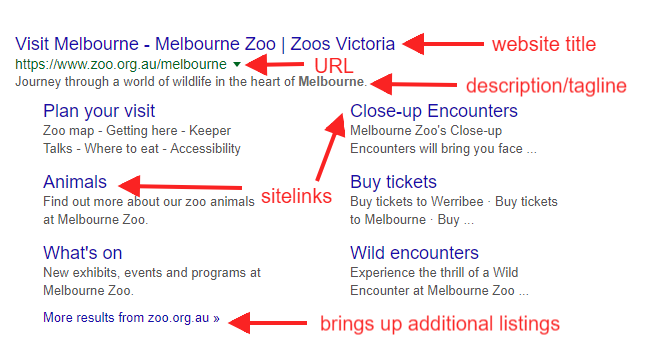
- Annotate your own “anatomy of a search result” example like the one I made below. Explore the different ways search results display; some have more details like sitelinks and some do not.